
DeepSeek Harness Worktrees: A First-Run Guide
DeepSeek-V4 Team · October 14, 2026 · 6 min read

A separate checkout is useful when you want an agent to try a change without moving the files you are already editing. DeepSeek Harness dsh-v0.2.1-alpha.2, released on October 9, 2026, adds an experimental Git Worktrees plugin for that job. It creates a branch and checkout, then changes the calling session's working directory.
This tutorial uses the version-pinned plugin guide to define a small acceptance exercise: create a worktree, make one documentation change, inspect it and return. It is a documentation-based workflow, not a claim that we tested the Harness desktop application. The code-shaped tool examples describe agent calls; they are not commands to paste into your shell.
Check the repository before enabling the plugin
Use a disposable repository or a project where you understand the current changes. The worktree runtime requirements specify Git 2.45 or newer and Node in the execution environment used by the filesystem provider. With a remote environment, the versions on your laptop alone do not establish that requirement.
Start by asking for the repository root, current branch, current commit and short Git status. These read-only shell commands provide the underlying checks:
git --version
node --version
git rev-parse --show-toplevel
git branch --show-current
git rev-parse HEAD
git status --short
An empty branch name can mean a detached HEAD; record that rather than inventing a branch. A nonempty status is not automatically a failure, but it means some work exists outside the committed baseline. Decide whether the new task needs those changes. If it does, prepare an appropriate commit first instead of assuming the worktree will copy them.
The plugin does not copy staged, unstaged, untracked or ignored files. Dependencies, local environment files and generated output can therefore be absent even when the source checkout runs successfully.
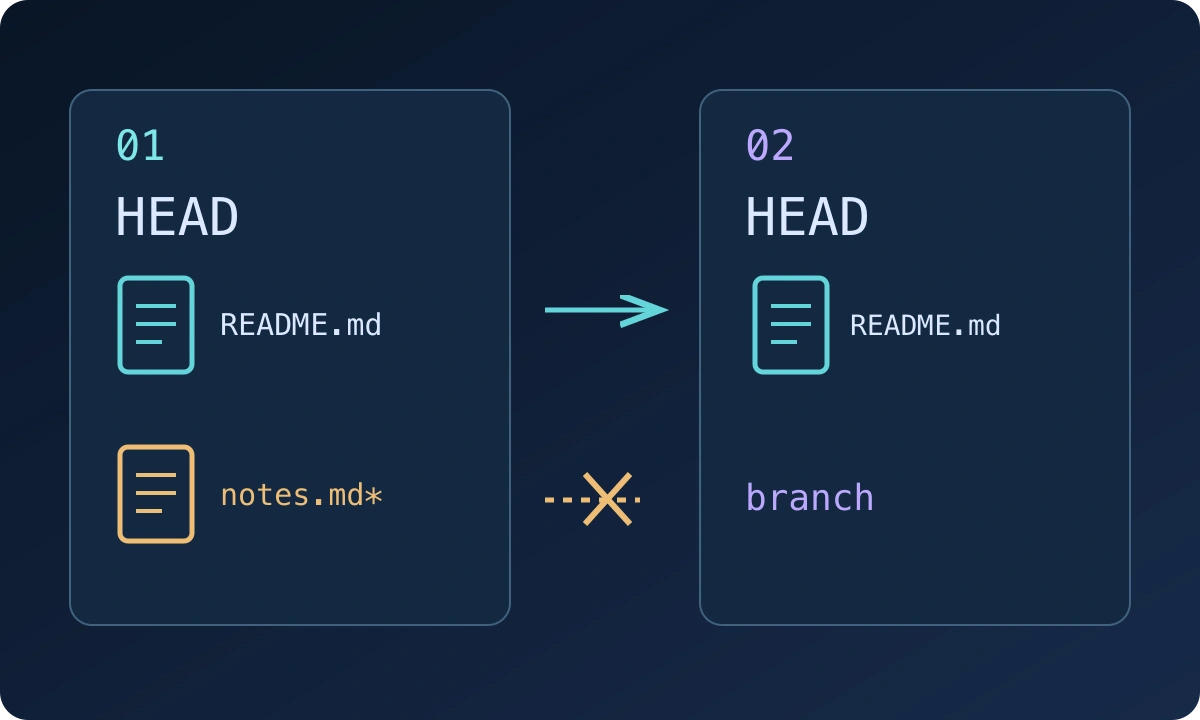
The diagram represents the documented copy boundary, not an application screenshot. Both checkouts use shared Git administration; separate files do not make their histories independent.
Enable Git Worktrees and choose a small task
Open Plugins → Official → Git Worktrees and enable the switch. According to the pinned plugin guide, the optional bundle is off in every shipped profile. It loads the worktree runtime and creation tool together.
For the first task, use a narrow request: create a worktree for a documentation correction, show its directory and baseline, and wait before editing. Ask for a new, unused branch name such as docs-worktree-trial. The same name is used for the relative checkout directory, so a short descriptive name makes later inspection easier.
The creation call has this shape:
create_worktree({ name: "docs-worktree-trial", from: "HEAD" })from must resolve locally. A remote branch name visible on a hosting website is not enough if its objects are unavailable in this repository. The operation does not fetch missing objects, initialize submodules or install packages. Resolve those prerequisites deliberately before retrying a failed creation.
Verify the returned directory before making changes
A successful call returns path, branch, baseCommit and repositoryRoot. Keep those four values together. The subsystem reference specifies that Git setup completes before the session changes directory.
The default destination is beneath the current checkout at .agents/worktrees/<name>. If the session starts in a linked checkout, that checkout is the source root for the new pool. Do not substitute a path remembered from another session for the returned canonical path.
| Returned field | What to verify |
|---|---|
path |
The session is now in this checkout |
branch |
It is the new branch you requested |
baseCommit |
It is the intended local starting revision |
repositoryRoot |
It identifies the checkout you started from |
Ask the agent to run the root, branch and commit checks again from its current directory. Compare them with the creation result. Ordinary repositories should have the intended starting content, but the runtime notes that repository-local replacement references can affect checked-out content; a commit identifier alone is not a substitute for inspecting the files you plan to change.
Make one edit and inspect the diff
Choose an existing README paragraph and ask for one factual clarification. Avoid starting with dependency upgrades or a repository-wide formatter: those produce large diffs that make directory mistakes harder to spot.
After the edit, inspect the current branch and changes:
git branch --show-current
git status --short
git diff --check
git diff -- README.md
Use your actual filename if the task changes a different file. The last command shows unstaged changes; if the agent staged the edit, also inspect the staged diff. A clean git diff --check only checks whitespace errors. It does not establish that the paragraph is correct or that the project builds.
Run the smallest relevant project check when the change needs one. Record the command, directory and result. For a documentation-only change, reading the rendered text may be more useful than running an unrelated test suite.
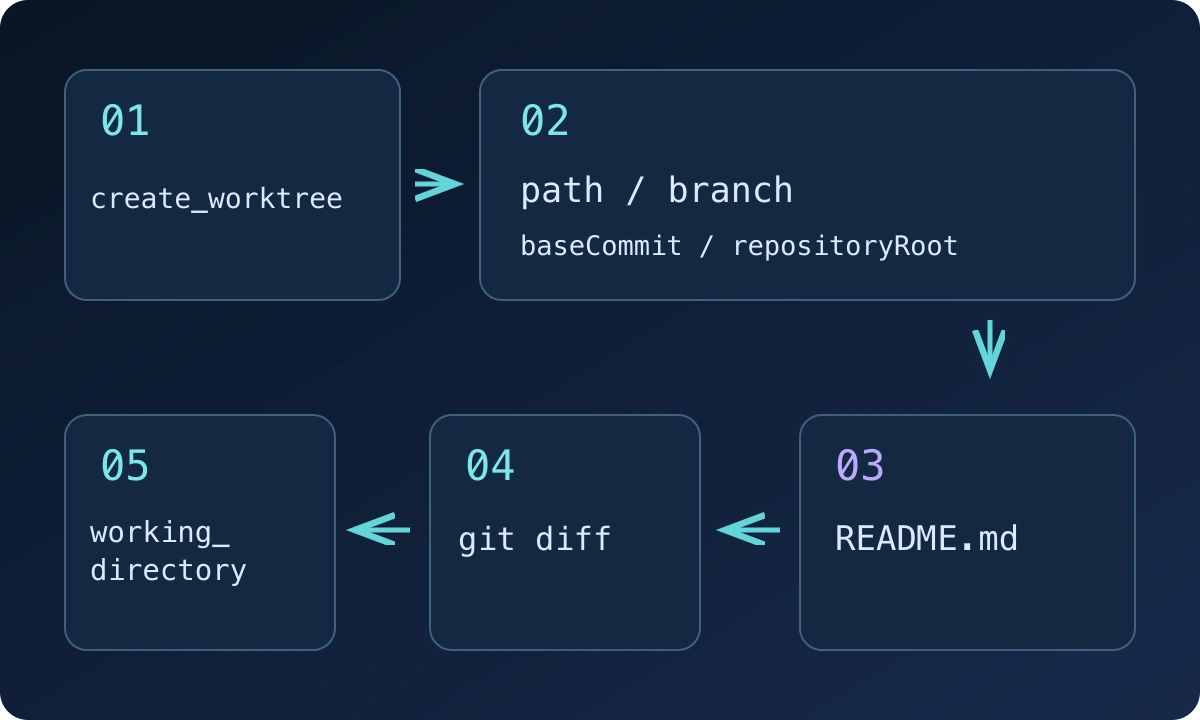
The numbered path follows the exercise: create, verify, edit, inspect, leave. The retained branch and directory still need a later decision about integration or cleanup.
Leave deliberately and retain the review context
To return, ask the agent to call working_directory with the original absolute checkout path. For example, replacing the sample path with your recorded repositoryRoot:
working_directory({ cd: "/absolute/path/to/original-checkout" })Verify the current directory again. Leaving does not merge the change, remove the checkout or delete its branch. Disabling the Git Worktrees plugin also leaves existing worktrees in place, while the built-in working-directory tool remains available.
Review the diff before deciding how to integrate it. Commit and merge or cherry-pick according to your normal repository workflow. When the checkout is no longer needed, inspect its status and use Git's normal worktree removal process after preserving any changes. Avoid force removal as the default response to a dirty checkout.
Diagnose failures without repeatedly creating branches
An existing branch or checkout path causes an error. Inspect what already exists before trying another name, especially after cancellation: setup failures may leave partial artifacts and report their location. Repeatedly generating names can obscure which checkout contains the work you intended to keep.
A permission error is different. Creation needs the existing sandbox policy to allow writes to the destination and shared Git metadata. The plugin does not widen those permissions. Identify the denied location before changing configuration.
Finally, stored Git LFS pointers or encrypted blobs may remain unexpanded because checkout skips configured clean, smudge and process filters. Treat hydration or decryption as a separate operation. A checkout can be valid while still lacking the runnable environment your task needs.
Keep the returned four-field record with the reviewed diff and check result. That is enough context to resume the exercise without guessing which directory or baseline the agent used. For the broader release and SDK changes, see the alpha.2 upgrade guide.